Meta advertising Manager: Complete Beginner’s Guide to Facebook & Instagram Ads
Suppose you have a good product or service, but only a limited number of people know about it. You may be posting frequently on social media platforms, but you can only reach a limited number of people. This is where paid advertising can play a crucial role. With the help of Meta advertising Manager, you can now reach thousands or even millions of potential customers through Facebook ads as well as advertising on Instagram.
You may be a small business owner, a beginner in digital marketing, or a student who wants to learn more about social media advertising. Whatever you may be, learning how the Meta advertising Manager works can change the way you market completely.
In this article, you will learn everything you need to know about Meta ads, how the Meta advertising Manager works, as well as how you can use it for effective advertising.

What Are Meta Ads?
Meta ads are the paid promotions you see while scrolling through Facebook or Instagram. For example, when you are watching reels and suddenly see a clothing brand, skincare product, or course promotion—that is a Meta ad. These ads help businesses reach people who may not follow them yet but could be interested in their products or services. Everything is created and managed using the Meta advertising Manager, which is the main tool that helps businesses run ads easily. With this tool, you can choose who will see your ad based on age, location, interests, and behavior. Meta ads can appear in different formats like images, videos, carousels, stories, and reels, which makes them engaging and effective. For instance, a small home bakery can use Meta ads to show their cakes to people living nearby, increasing their chances of getting more orders
By utilizing Meta advertising Manager, businesses can advertise:
By utilizing , businesses can advertise:
- Products
- Services
- Websites
- Instagram pages
- Facebook pages
- Mobile apps
For instance, if you own a clothing company, you can utilize Meta advertising to execute Facebook ads and show your products to people who have an interest in fashion. Advertising on Instagram also enables you to reach a younger demographic since they tend to spend more time on this platform compared to others.
Meta ads appear on various platforms such as:
- Facebook feed
- Instagram feed
- Instagram stories
- Facebook stories
- Reels
- Messenger
The most significant advantage of utilizing Meta advertising is that you can target specific audiences based on age, location, and interests.
Why Businesses Should Use Meta advertising
Today, social media is one of the most powerful marketing tools. But organic reach alone is not enough. The Meta advertising allows businesses to scale faster and reach the right customers.
Here are some key benefits of using advertising Manager of Meta:
1. Reach the Right Audience
It allows precise targeting. You can target people based on:
- Age
- Gender
- Location
- Interests
- Behavior
For example, if you sell gym products, you can target people interested in fitness.This makes advertising on facebook and advertising on instagram highly effective.
2. Budget Control
One of the best features of Meta advertising is budget flexibility.
You can:
Start with as little as ₹100 per day
Increase budget anytime
Stop ads anytime
This makes facebooks ads perfect for small businesses and beginners.
3. Measurable Results
Unlike traditional advertising, Meta advertising shows detailed performance data such as:
Reach
Clicks
Conversions
Engagement
This helps you understand what is working and what needs improvement.
4. Faster Business Growth
With Meta advertising , businesses can grow faster because they can reach new customers instantly through advertising on facebook and advertising on instagram.
Types of Meta Ads You Can Create:-
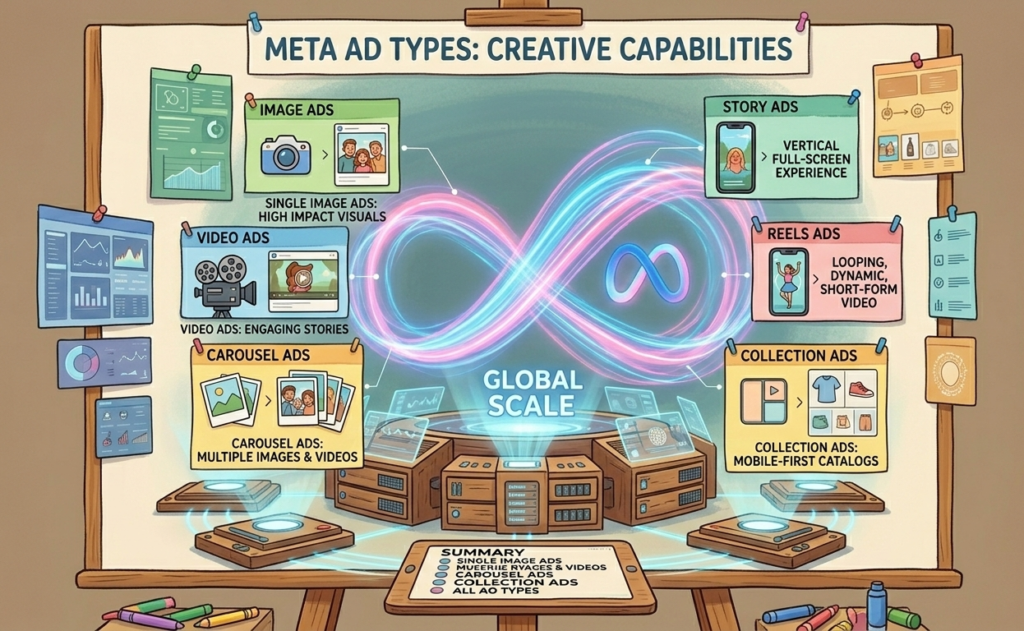
One of the best things about using the Meta advertising Manager is that it gives you different ad formats to choose from depending on your goal. Whether you want more sales, website visitors, followers, or brand awareness, the Meta advertising helps you create ads that fit your exact objective. These ads work smoothly across facebooks ads and advertising on instagram, allowing you to reach people where they spend most of their time.
Let’s understand these ad types in a simple and practical way:
1. Image Ads
Image ads are the easiest and most beginner-friendly option available in the Meta advertising Manager. As the name suggests, these ads use a single image along with a caption and a call-to-action button like “Shop Now” or “Learn More.”
Image ads are best for:
Promoting a single product
Sharing special offers or discounts
Increasing brand awareness
Bringing traffic to your website or page
They work well because they are simple, clear, and quickly grab attention.
2. Video Ads
Video ads are more engaging and powerful compared to image ads. Using the Meta advertising , you can create video ads that show your product in action, explain your service, or tell your brand story.
Video ads are best for:
Showing how a product works
Explaining services
Sharing tutorials
Connecting emotionally with the audience
The Meta advertising makes it easy to run video ads on both Facebook and Instagram, helping businesses increase engagement and conversions.
3. Carousel Ads
Carousel ads allow you to show multiple images or videos in a single ad. People can swipe through different slides, which makes the ad more interactive and informative.
With the help of the Meta advertising Manager, businesses can showcase multiple products, features, or benefits in one place. This format is widely used in facebooks ads and advertising on instagram, especially by e-commerce brands.
Carousel ads are best for:
Showing multiple products
Highlighting different features
Explaining steps or processes
Creating visual storytelling
These ads are effective because they keep users engaged longer.
4. Story Ads
Story ads appear between stories when users are viewing stories on Facebook or Instagram. These ads feel natural because they look similar to regular stories shared by users.
Using the Meta advertising Manager, businesses can create story ads that are full-screen and visually appealing. This format works extremely well in advertising on instagram, where millions of users watch stories daily.
Story ads are best for:
Quick promotions
Announcing limited-time offers
Increasing brand awareness
Getting more engagement
Story ads are effective because they feel personal and blend naturally with user content.
5. Reels Ads
Reels ads are one of the most popular and fastest-growing ad formats today. These ads appear between reels and look similar to organic reel content.
With the Meta advertising Manager, businesses can create reels ads that feel natural and engaging. Since reels have very high reach, reels ads perform extremely well in both advertising on instagram and facebooks ads.
Reels ads are best for:
Reaching new audiences
Increasing brand visibility
Promoting products creatively
Getting high engagement
Reels ads are especially useful for targeting younger audiences and growing faster.
How Meta advertising Manager Works
Meta Manager works using a structured system that includes three levels:
Campaign
Ad Set
Ad
Understanding this structure is important.
Campaign Level
This is where you choose your goal, such as:
Traffic
Engagement
Sales
Leads
Meta advertising uses your goal to optimize performance.
Ad Set Level
This is where you define:
Audience
Budget
Placement
Meta advertising allows detailed targeting here.
This ensures effective advertising on facebook and advertising on instagram.
Ad Level
This is where you create the actual ad.
You add:
Image or video
Caption
Call-to-action
Meta advertising Manages then shows your ad to the selected audience.
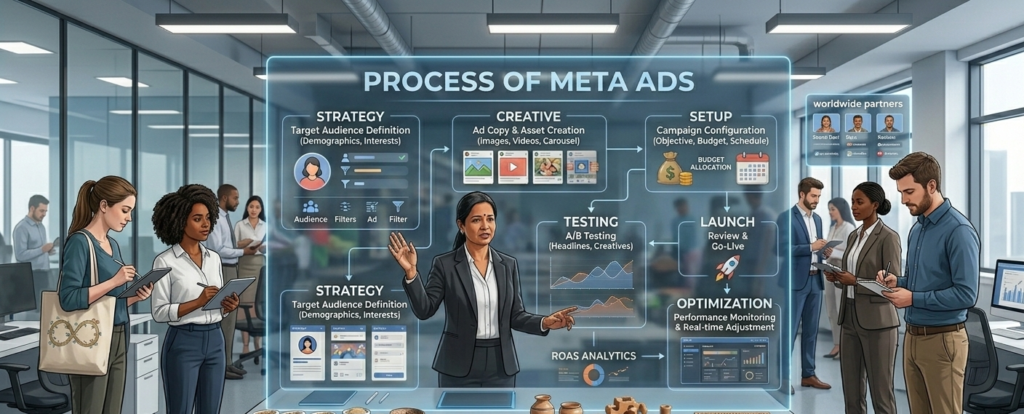
Step-by-Step Guide to Creating Ads Using Meta advertising Manager:-
Here is a simple step-by-step process:
Step 1: Open Meta advertising Manager
Go to Meta advertising and click on “Create”.
This is the starting point for facebooks ads and advertising on instagram.
Step 2: Choose Campaign Objective
Select your goal such as:
-
Website traffic
-
Engagement
-
Leads
-
Sales
Meta advertising will optimize based on your goal.
Step 3: Select Your Target Audience
This is the most important step.
You can select:
-
Location
-
Age
-
Gender
-
Interests
Meta advertising ensures your ads reach the right people.
Step 4: Set Budget
Choose:
-
Daily budget
or -
Lifetime budget
Meta advertising Manager gives full control.
Step 5: Choose Placement
You can select:
-
Facebook
-
Instagram
-
Both
Advertising on facebook and advertising on instagram together gives better results.
Step 6: Create Your Ad
Upload:
-
Image or video
-
Caption
-
CTA button
Meta advertising Manager will review and publish your ad.
Tips for Better Results Using Meta advertising Manager
1. Use High-Quality Images and Videos
Visual content performs better.
Meta advertising Manager prioritizes engaging ads.
2. Target the Right Audience
Correct targeting improves performance.
Meta advertising Manager provides advanced targeting tools.
3. Start with Small Budget
Test first, then scale.
Meta advertising Manager makes budget control easy.
4. Test Different Ads
Try different:
Images
Videos
Captions
Meta advertising Manager helps identify best performers.
5. Monitor Performance
Always track results.
Meta advertising Manager provides performance insights.
Common Mistakes to Avoid
Many beginners make mistakes while using Meta advertising Manager.
Avoid these:
1. Wrong Targeting
Poor targeting reduces effectiveness.
Meta advertising Manager helps refine targeting.
2. Poor Quality Content
Low-quality visuals reduce engagement.
Advertising on instagram especially requires good visuals.
3. Not Testing Ads
Testing improves results.
Meta advertising Manager supports A/B testing.
4. Ignoring Analytics
Always check performance.
Meta advertising Manager provides useful data.
Real-Life Example
Suppose you own a skincare brand.
Using Meta advertising Manager, you can:
Target women aged 18–35
Show ads on Instagram
Promote skincare products
Advertising on instagram helps reach beauty audiences.
Facebooks ads help reach broader audiences.
This increases sales and brand awareness.
Meta Ads Policies, Terms, and Conditions
Before you start running ads, it’s important to understand that Meta has certain rules to keep the platform safe and trustworthy for everyone. When you create an ad using the Meta advertising Manager, Meta reviews your ad to make sure it follows their Meta policies.(Here you can go through) This review process helps ensure that users only see genuine and safe advertisements. If your ad breaks any rules, it may not get approved, or in some cases, your ad account could be restricted. That’s why following the guidelines from the beginning is very important.
Meta wants ads to be honest and clear. When running facebooks ads or advertising on instagram, you should always present your product or service truthfully. For example, you should avoid making unrealistic promises like “100% guaranteed results overnight” if it’s not true. People should clearly understand what you are offering just by looking at your ad. The Meta advertising Manager also protects user privacy, which means advertisers cannot misuse personal information or target people in unethical ways.
Conclusion
The Meta advertising Manager is a powerful tool that helps businesses and creators promote their products through facebooks ads and advertising on instagram in a smart and controlled way. Instead of showing your ads to random people, it helps you reach the exact audience who are more likely to be interested in what you offer. You can decide how much money you want to spend, who should see your ads, and also track how your ads are performing. This makes it easier to understand what is working and how you can improve your results.
Even if you are a beginner or a small business owner, learning how to use the Meta advertising Manager can make a big difference in your growth. It gives you the opportunity to reach more people, increase engagement, and grow your brand faster than organic posting alone. With the right strategy, proper targeting, and engaging content, you can use to increase your visibility, attract potential customers, and boost your sales. If you want to grow in digital marketing and take full advantage of social media platforms, learning and using this tool is an important step toward long-term success.